Building OpenClaw Health Agent: A Blood Pressure Assistant for My Family in China
Building from Scratch: An OpenClaw Blood Pressure Assistant for My Family on WeChat
I started this project for a very personal reason.
An older family member in China was diagnosed with hypertension, and the doctor asked for blood pressure readings every morning and evening, with records kept properly for future visits. It sounds manageable when you hear it in one sentence, but our day-to-day routine quickly proved otherwise.
I live in Europe, so even basic follow-up is hard because of the time difference. On top of that, there are plenty of health apps, but getting an elderly person to install one, register, remember where to tap, and keep doing it daily is usually where the plan breaks.
What already works for them is WeChat. That became the turning point for me. Instead of teaching a new workflow, I decided to move the workflow into a place they already use without thinking.
The first version is intentionally simple. They send something like “140/90 this morning” (or a photo of the monitor), and the agent pulls out the numbers, stores the record, and replies with a risk-aware message. If this keeps running smoothly, it can become a small but reliable routine rather than another abandoned reminder.
I also want to run it in a small family group chat so relatives can help watch the trend and support this person together.
This post is my first build log: what worked, what broke, and what I learned while getting the first version online.
Why Tencent Cloud and DeepSeek
I picked Tencent Cloud even though I am abroad and an overseas VPS would have been easier to buy and manage. My users are in China, the interaction channel is WeChat, and I care more about stable response time than convenience on my side. In this scenario, where the server sits matters more than squeezing a little extra value from hardware specs.
For the model side, this use case is mostly about structured extraction and threshold checks. I was not chasing creative output. I needed steady behavior and a cost profile I could actually keep running. DeepSeek felt like the most practical option.
The basic setup looked like this:
# Set DeepSeek as provider
c config set llm.provider deepseek

# Inject API key
c config set llm.api_key "sk-YourDeepSeekKeyHere"

# Set default model
c config set llm.model "deepseek-chat"
At this point I honestly thought I was done with setup. That was optimistic.
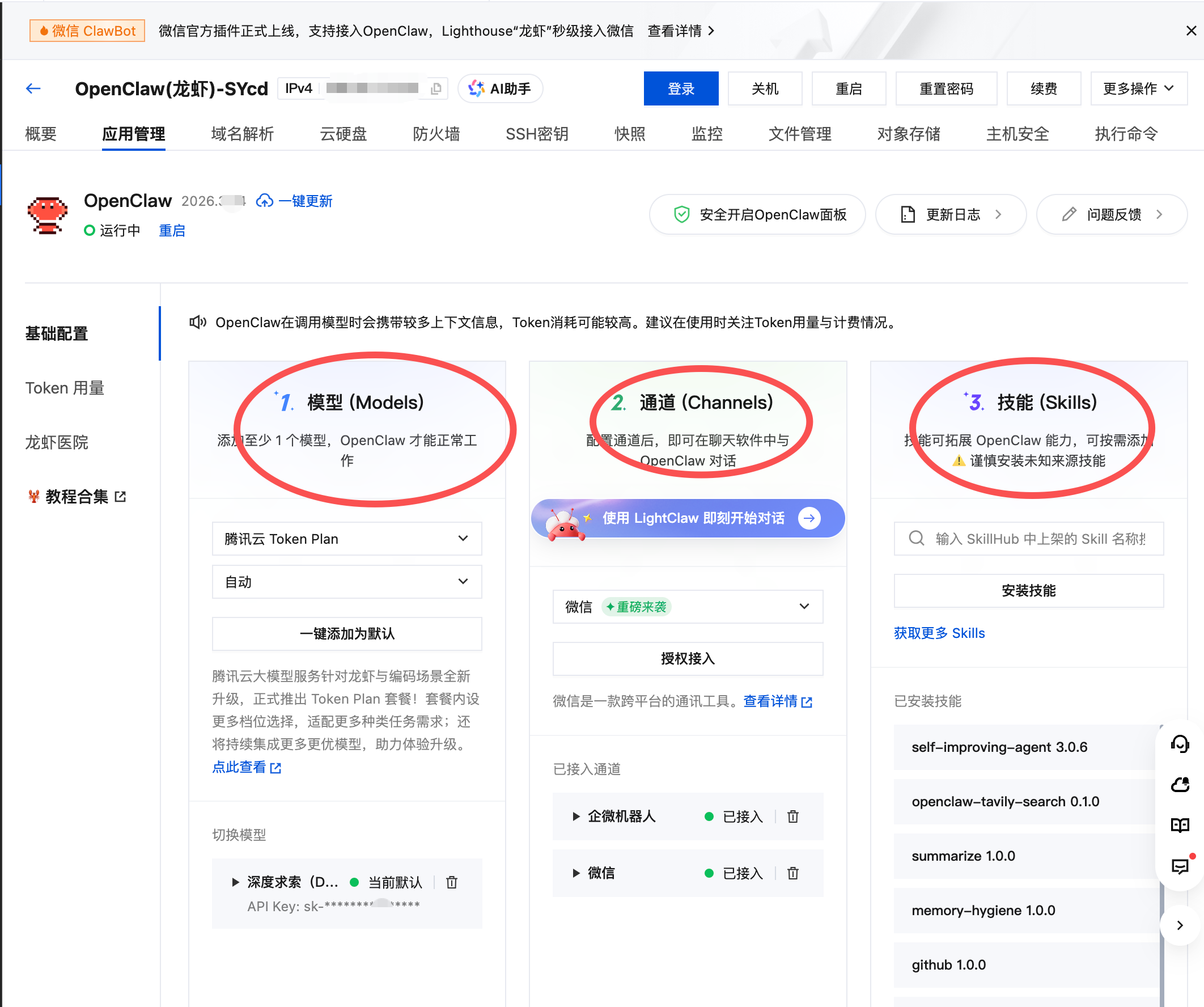
As you can see, that’s very convinien
The First Real Pitfall: Network Access
OpenClaw’s Dashboard runs on port 32697 by default. I mostly work in CLI anyway, but I still wanted the UI for quick checks and debugging.
I spent a few frustrating hours trying to open the Dashboard from outside. I checked server configs, security groups, and firewall settings over and over. The root cause turned out to be much less dramatic: my campus Wi-Fi was limiting access to non-standard ports like 32697.
So I mapped external access to port 80 and left OpenClaw’s internal ports as they were.
One note that can save a lot of pain: do not change the core gateway communication port in gateway.json (for example, changing 18789 to 80). It can break the CLI-to-gateway link and you may end up with not connected to gateway.
Using system-level forwarding was the safer fix:
# Forward TCP 80 -> 32697 (OpenClaw Dashboard)
sudo iptables -t nat -A PREROUTING -p tcp --dport 80 -j REDIRECT --to-port 32697
Another detail that is easy to miss: changing rules inside Ubuntu is not enough. You also need to allow inbound TCP 80 in Tencent Cloud Security Group, or traffic is blocked before it ever reaches your machine.
To keep the gateway process from disappearing when the session closes, I ran it with nohup:
nohup c gateway --force > gateway.log 2>&1 &
After this, access became stable and I could finally stop fighting the network layer.
Of course, there will be more security problems to solve later, but for now this was the first big hurdle.
Bringing the First Agent to Life
OpenClaw 2026 feels different from older versions. Earlier workflows were more command-heavy (c agents add --file and similar patterns). With the Workspace approach, it is cleaner: put the config in the right place and let the system load it.
I created a workspace called Hi:
mkdir -p /root/.openclaw/workspaces/Hi/
cd /root/.openclaw/workspaces/Hi/
Then I wrote agent.yaml for the first MVP:
id: "Hi"
name: "BP-Health-Assistant"
version: "1.0.0"

instructions: |
  You are a professional blood pressure monitoring assistant.
  Tasks:
  1) Extract systolic (SBP) and diastolic (DBP) values from user messages.
  2) Apply threshold rules:
     - If SBP >= 140 or DBP >= 90, reply:
       "Your blood pressure is /. It is slightly high. Please rest for 15 minutes and recheck."
     - If SBP >= 180 or DBP >= 110, reply:
       "Emergency warning: blood pressure is critically high. Please seek medical care immediately and notify family members."
     - Otherwise, reply:
       "Recorded successfully. Your current reading is within the expected range."
  3) Use the memory capability to store blood pressure records for trend tracking.

bindings:
  - channel: "openclaw-weixin"
    trigger: "always"
Then I ran:
c status
When Hi appeared in the mounted list, I knew the first end-to-end loop was alive.
What Is Still Missing
The current version already handles the core loop: receiving readings, extracting values, storing records, and returning threshold-based feedback. But it is still an early prototype, not something I would call production-ready for family health management.
In the next post, I will go deeper into two parts that are harder than they look: getting the WeChat channel reliable end-to-end, and debugging safely when logs are masked by default in the 2026 framework. I will also share how I use c acp trace while keeping privacy boundaries intact.
Note
This project is a personal health-support tool for family use. It is not medical advice. If blood pressure remains high or acute symptoms appear, professional medical care should always come first.
Now another need is emerging: more family members want their own version of this private assistant. So the next step for me is to make the design more modular and reusable, with multi-user management and a more flexible instruction layer that can support health parameters beyond blood pressure.
The journey continues.
What’s more, when the conversation gets more complex and expands, especially when it involves a time series of health data and report, I will need to build a more robust memory system to track trends and history, so that the assistant can provide more personalized and context-aware feedback. So, vector databases and RAG is necessary for the next stage.